


This post was originally published on here
Follow ZDNET: Add us as a preferred source on Google.
ZDNET’s key takeaways
- Claude free users can access features previously for subscribers.
- Use custom skills, longer conversations, and external connectors.
- The new perks mean you may no longer need a subscription.
I have a Pro subscription to Anthropic’s Claude AI that’s due to expire at the end of the month. Normally, I would have renewed the plan as I use Claude both personally and professionally. But just in the nick of time, Anthropic has added four cool new features to the free plan. Collectively, they’ve convinced me to put the kibosh on my subscription, at least for now, and save myself the $20 a month.
In a new LinkedIn post, Anthropic touted the new perks and described how they work.
File creation
First up is file creation. Here, you can ask Claude to create different types of files based on a new request or an existing conversation. The AI is capable of generating Word documents, Excel spreadsheets, PowerPoint presentations, PDFs, and more. You can also upload a file and tell Claude to modify it or convert it into a different format.
Also: I tried a Claude Code rival that’s local, open source, and completely free – how it went
I asked Claude to create a PowerPoint presentation on how and when the planet Earth got its name. After a couple of minutes, the presentation appeared in the right pane of the screen, where I could open it in Google Drive or download it to my PC. The resulting file was cleanly designed and formatted, and provided the right amount of information.
Connectors
Next in line are connectors. Here, you’re able to connect Claude to different apps to add context or include details from external services. For this, the AI can connect to Google Drive, Gmail, Google Calendar, GitHub, Box, Canva, Slack, Monday.com, Figma, and a host of others. After you set up a specific connection, you can then reference any information from that app or service.
For this one, I asked Claude to summarize a document stored on Box on translation apps for the iPhone. After finding the correct document, the AI provided a brief summary of it.
Custom Skills
The third perk is for custom skills. Using this feature, you can teach Claude how you like to work, and it will remember your tone, setup, and other preferences. To kick this off, you create a simple text file that contains the skills you want Claude to adopt. You can tell it how you want the AI to communicate (formal or casual) and how you want the responses presented (long or brief). You could also include information about yourself or your work, as well as industry terms or guidelines to follow.
Also: Anthropic says its new Claude Opus 4.6 can nail your work deliverables on the first try
To try this one, I created a text file with the following information: “I want you to communicate in a casual style but offer longer and more detailed responses. I’m a freelance technology writer and reporter. You can use computer industry jargon in your responses.” I then uploaded the file to Claude and told it that this was a skills file with my preferences. In response, the AI confirmed the information in the file and added it to its repertoire for future conversations.
Longer conversations
The fourth major perk is longer conversations, or compaction. Normally, you might bump into memory or context limitations with a lengthy conversation, requiring you to start a new one about the same topic. But Claude is able to summarize earlier parts of a conversation in a condensed or compacted manner, allowing you to continue without any bumps in the road. You don’t have to do anything special for this to work, as the AI will automatically compact past information.
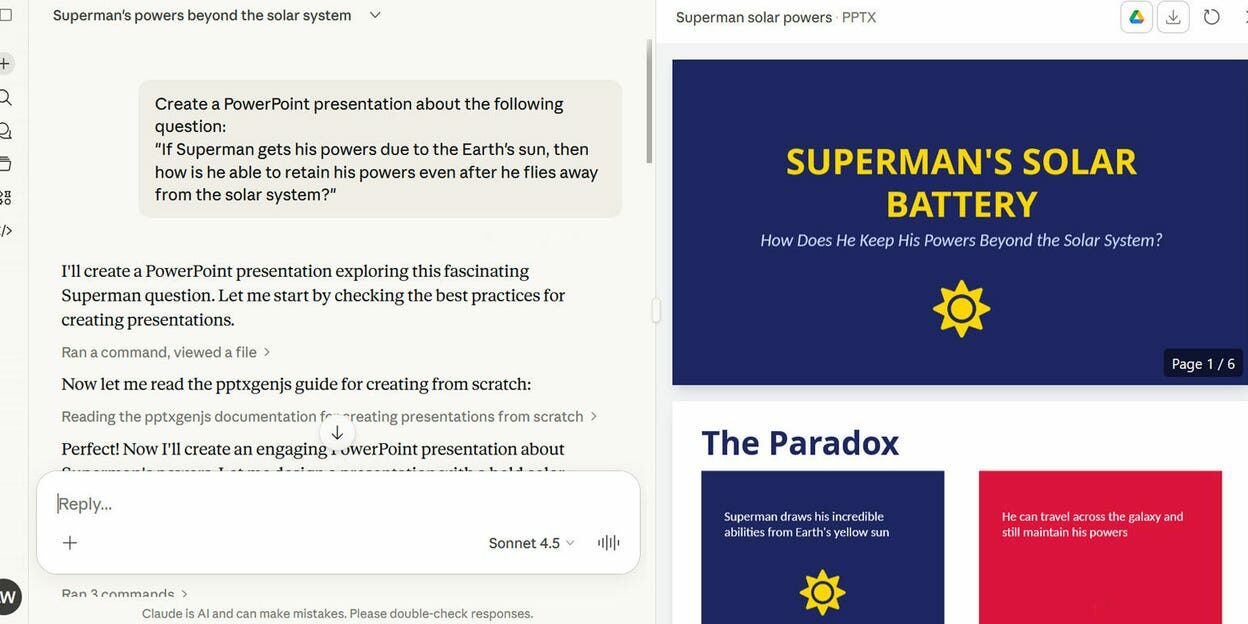
To try this out, I resumed a previous conversation in which I asked Claude the following: “If Superman gets his powers due to the Earth’s sun, then how is he able to retain his powers even after he flies away from the solar system?” Here, I was able to continue the conversation for quite a while without running into any limitations.
Free vs paid
Do the new features mean you no longer need a paid subscription? Not necessarily. There are still certain advantages to being a subscriber. You won’t hit daily quotas as you would with a free account. A subscription offers access to the full range of models, some of which are more skilled in specific areas. Subscribers also get early access to new features.
But since Claude is not my primary AI and I have subscriptions to other services, I’m certainly going to see how I fare with just the free version.