


This post was originally published on here
Follow ZDNET: Add us as a preferred source on Google.
ZDNET’s key takeaways
- Firefox 150 enhances split view, tab sharing, and other features.
- The latest version also fixes a whopping 271 security flaws.
- Anthropic’s Claude Mythos Preview AI model found the many flaws.
Keeping your web browser updated can be a hassle. But typically, you want to snag the latest updates as they introduce new features and fix security holes. That’s certainly the case with the newest update to Firefox.
Released on Tuesday, Firefox 150 enhances a variety of must-have features, including split view, tab management, language translations, and the built-in PDF editor. But even more critically, the new version patches a whopping 271 security bugs, thanks to the help of AI.
Also: Can you trust Firefox’s new free VPN for all browser users? What you need to know
First, let’s look at the new and improved features.
Split View enhancements
Introduced to Firefox in March, Split View lets you view two web pages side-by-side in the same window, an option that had already been available in Chrome and Microsoft Edge. You can then compare the two pages and work with each one separately.
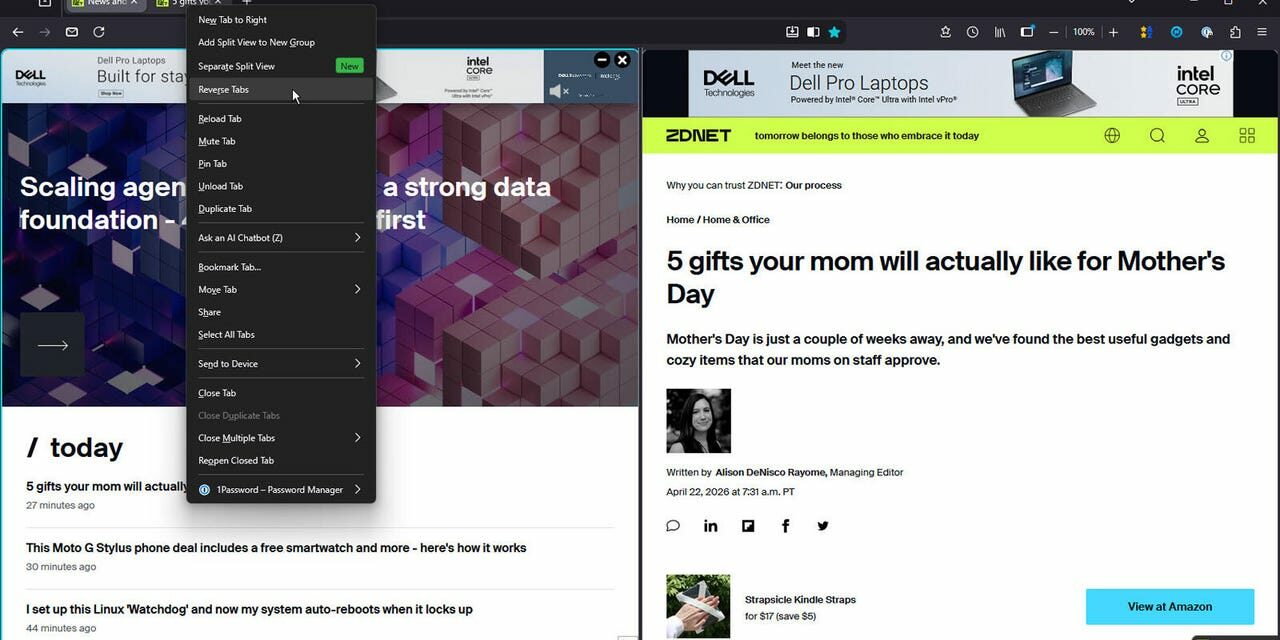
With Firefox 150, you can now right-click on any link on a page and open it in split view to see it alongside your current page. When in Split View mode, you’re also able to search your open tabs and reverse the order of the two pages.
Better tab sharing
You’ve always been able to share single pages in Firefox with another person or device. Now, you can share multiple tabbed pages in one shot. Just select the tabs you wish to share and right-click on any of them. Select Share from the menu and then click the command to copy X number of links. When you paste the links into other apps, both the page title and URL are included.
Also: I’ve used nearly every browser out there, and these are my top 4 (spoiler: Chrome is out)
This sounds like a useful feature if only it worked. In version 150, when I right-click multiple tabs, there is no Share command, unlike when I right-click a single tab. I contacted Mozilla to find out why this isn’t working as described.
Real-time translations
Need to translate a piece of text into a different language? You can now do that easily enough in Firefox. Type the phrase “about:translations” in the address field. You’re then taken to a translation page similar to Google Translate. Here, you can copy and paste the text you want translated. Select the source language or let the tool automatically detect it. Select the target language. The translation then appears.
PDF editing
Beyond just displaying a PDF you find online or load from your PC, Firefox will now let you edit it. Using the built-in PDF editor, you’re able to reorder, copy, paste, delete, and even export individual pages from a PDF.
To try this, open a PDF in Firefox and click the Manage pages icon in the upper left. You’ll then see thumbnails of all the pages in the file. Here, you can select individual pages to delete them, as well as copy or cut them to paste them elsewhere. You can also move pages by dragging and dropping them, and export individual pages as separate files. When done, you can save the modified PDF.
Also: How Google’s updated AI Mode will ease your tab clutter when you search
To update Firefox on the desktop, click the three-lined icon at the top, click Help, and select About Firefox. The browser will automatically download and install the latest update if necessary. Restart Firefox and you’re set.
Security fixes
That brings us to the security patches. Firefox 150 includes fixes for 271 security vulnerabilities. The list includes ones rated high, medium, and low. But collectively, they represent a record compared with the dozens of vulnerabilities typically addressed by past Firefox updates. How did the Firefox team find and fix so many security flaws? Thank AI.
To uncover the underlying flaws, the team turned to an early version of Anthropic’s Claude Mythos Preview, as revealed in a Mozilla blog post. Since February, the folks at Mozilla have been using frontier AI models to root out latent security holes in the browser. Previously, they used Anthropic’s Opus 4.6 model to scan Firefox version 148, leading to fixes for 22 security bugs.
Also: The best secure browsers for privacy in 2026: Expert tested
Typically, Mozilla’s human bug hunters are tasked with seeking out security flaws in Firefox. Even with advanced tools, that process can naturally take time. Anthropic’s game-changing AI model was able to find such a large number of flaws much faster and more efficiently. And the results are more than promising. The model can uncover any category or level of vulnerability that humans can identify, meaning nothing is missed.
Other major tech players such as Apple, Google, and Microsoft are also working with Claude Mythos as part of an initiative called Project Glasswing. This use of AI could be a turning point in cybersecurity. Typically, the defenders struggle to keep up with the attackers. In part, that’s because the attackers need to find only one critical vulnerability to exploit; the defenders need to find them all. But the right AI model gives the good guys a powerful tool in their arsenal, one that Mozilla is clearly putting to good use.